MIDI Piano Playground — teaching myself chords with a $64 keyboard and Claude Code
I bought a used Casio CTK-2090 keyboard for $64 in early July, partly as a new hobby for the summer. I have decent relative pitch — if I can hum a melody, I can usually find it on the keys by ear. That part came almost for free from years of casual guitar. What I can’t do is the left hand: which chords go under the melody, and when to switch. That gap is the whole reason this project exists.
Then a MIDI cable I’d ordered arrived, the Casio showed up on my Mac as a CoreMIDI device, and suddenly the piano problem looked like an engineering problem. Those I know how to work on.
Step 1: just see the notes
First goal: capture what I play as data. macOS speaks CoreMIDI natively, so I went with small dependency-free Swift scripts you run directly with swift file.swift — one to list MIDI devices, one to print Note ON/OFF events live, and one to record them with timestamps to a plain text file:
12.43 ON  E5
12.71 OFF E5
12.72 ON  G5
...
One gotcha for anyone trying this: the modern MIDIEventList.unsafeSequence() API wouldn’t compile on my machine’s Swift toolchain. The thing that works is the legacy MIDIInputPortCreateWithBlock + walking the MIDIPacketList manually. Old API, still solid.
(Fun hardware detail: the CTK-2090’s keys aren’t touch-sensitive — every note arrives at velocity 100. So dynamics can never come from this keyboard. Good to know before wondering why every recording sounds equally enthusiastic.)
Step 2: what key am I even playing in?
For my first real recording I played a melody I’d learned by ear off the internet. The analysis showed all white keys with phrases resting on C — key of C major. And from the note pattern alone, the melody turned out to be My Heart Will Go On from Titanic. I genuinely hadn’t set out to learn the Titanic song; my ear just went there.
The analyzer (tools/analyze.py, plain Python, no dependencies) does two things:
- Key detection with the classic Krumhansl-Schmuckler algorithm: build a duration-weighted histogram of the twelve pitch classes, correlate it against the 24 Krumhansl-Kessler major/minor key profiles, highest Pearson correlation wins. It nailed C major on all my takes with r ≈ 0.82–0.88.
- Chord suggestion: chop the recording into fixed time windows, score each candidate chord by how well it covers the melody notes in the window (root weighted 1.5×, a bonus for the note you land on, and a small “pop prior” nudging it toward I/IV/V/vi), then run Viterbi smoothing over the sequence with a chord-change penalty so it doesn’t flip-flop every window.
Reality check: on a recording of me actually playing chords, it recovered the C → G → F progression almost exactly. On sparse melodies it under-suggests the IV and vi chords — a C-heavy melody legitimately scores C everywhere, and even a human needs lyric and rhythm context to know where the Am belongs. So the output is a first draft of a chord chart, not gospel. That’s fine; a first draft was exactly what I needed.
Step 3: the practice app
Knowing the chords and being able to play them at the right moment are different skills. So the next piece was titanic-practice.html — a single self-contained HTML page, no build step:
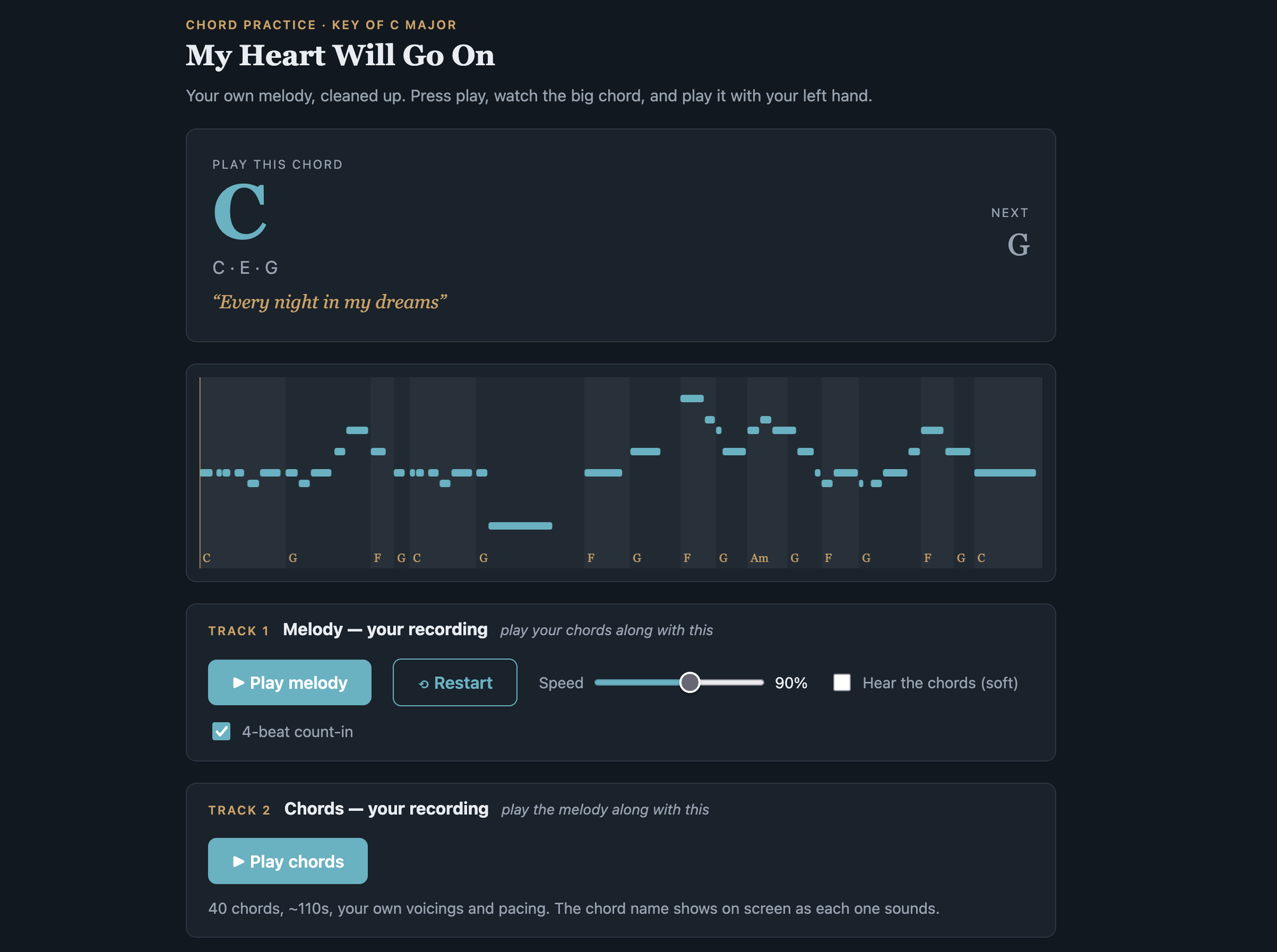
- It plays back my own recorded melody (cleaned up — two fumbles removed, timing smoothed) through WebAudio, while a big display shows play this chord now, the upcoming chord, and the current lyric line.
- A piano-roll canvas shows the melody notes over shaded chord regions with a moving playhead.
- Speed slider (50–120%), a 4-beat count-in, and a “hear the chords” toggle as scaffolding you turn off as you improve.
- The best part: live grading over Web MIDI. Connect the keyboard in Chrome, and the chord name turns green when you’re holding the right triad (pitch-class match, so any octave counts). At the end you get a score card listing exactly which chord changes you missed, by lyric.
Later it grew a second track: my recorded chord take as a play-along, so I can flip it — play melody over my own chords, or chords under my own melody.
One hosting gotcha: I first tried shipping this as a claude.ai artifact, but artifacts run in a sandboxed iframe that silently blocks Web MIDI — the permission prompt never appears. It has to be served locally (python3 -m http.server) for the live feedback to work. There’s a play.sh that starts the server and opens Chrome.
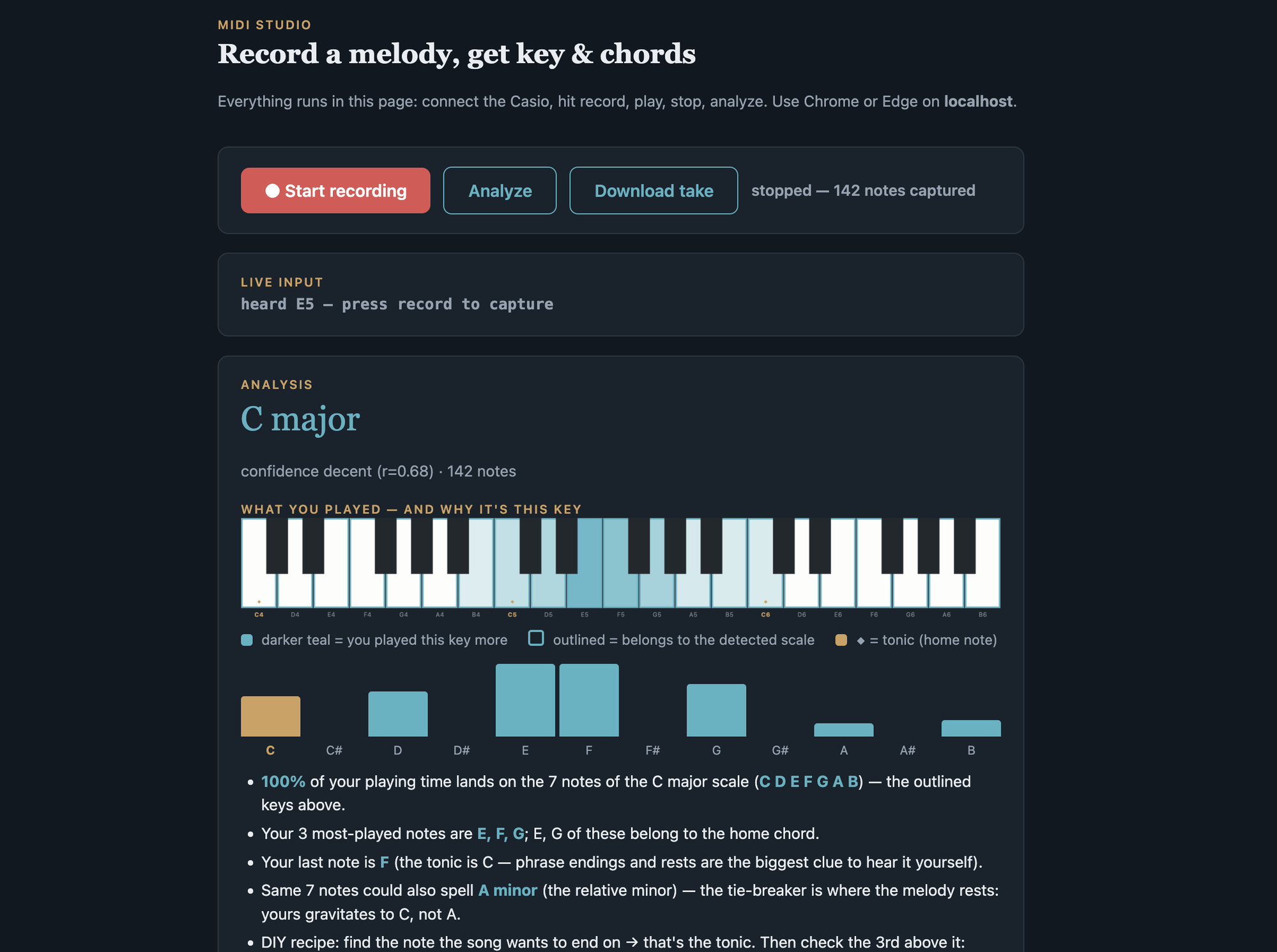
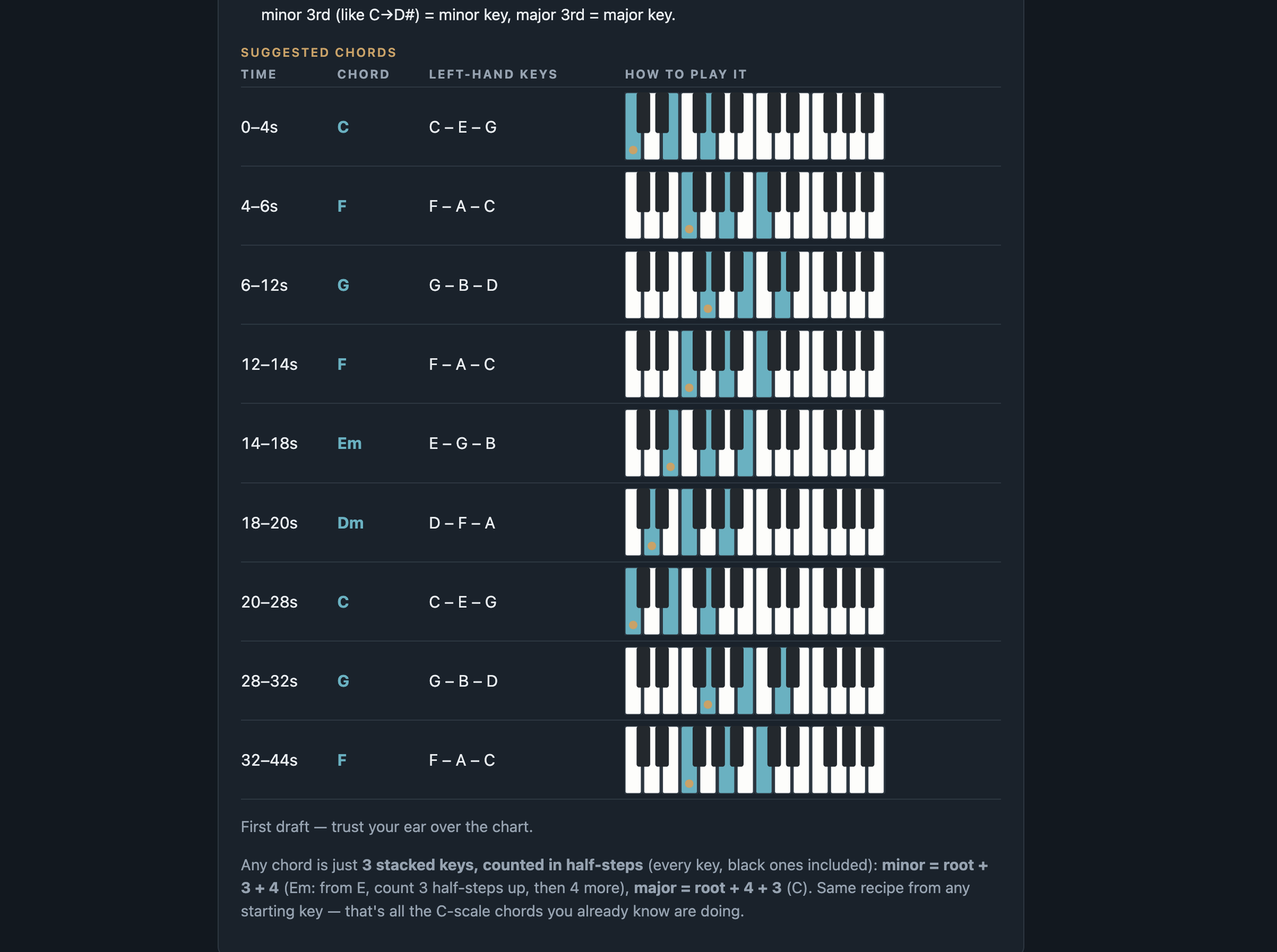
There’s also studio.html — a browser-only record/analyze studio (the key-detection logic ported to JS) with a take-history panel in localStorage and a keyboard heat-map that shows why it thinks the key is what it is:
Step 4: play along with the actual song
Practicing against my own wobbly recording only goes so far. The real song, though, is in E major, and all my chord practice is in C. So: audio pipeline.
- yt-dlp to download the official lyric video’s audio.
- ffmpeg to transpose E → C (down 4 semitones) while keeping tempo:
asetrate=SR*FACTOR,aresample=SR,atempo=1/FACTORwith FACTOR = 2^(−4/12) ≈ 0.7937. No rubberband needed. The vocals get a slightly “processed” timbre since formants shift too, but it’s completely playable-along-able. - Demucs (Meta’s ML stem separation) to split the song into stems. The killer output: a mix of vocals + drums + bass + guitar with the harmonic bed removed — a backing track where I supply the chords, muxed back onto the lyric video.
The Demucs surprise: the 6-stem model’s “piano” stem came out silent (−78 dB). This recording’s accompaniment is a synth pad + strings, which Demucs files under “other”, not “piano”. Lesson for pop ballads: don’t trust the piano stem — to remove the chordal bed, drop the whole “other” stem instead. (The other stem is also worth soloing just to study what the pro actually plays.)
What I actually learned about music
The tooling was the fun part, but the music learnings are the point:
- The entire song needs only four left-hand shapes: C (C·E·G), G (G·B·D), Am (A·C·E), F (F·A·C).
- The verse is just a C → G → F → G loop, one chord per phrase. The Am only enters in the chorus ("I believe…") — my first guess put Am in the verse, and cross-checking two chord sites (both transpose to the same shapes in C) corrected that.
- The rule of thumb that’s stuck with me: the chord should contain the melody note you land on, and you change chords on the first word of the phrase.
- C → G → Am → F is the pop workhorse progression. Learning these four shapes in one song quietly unlocks hundreds of others.
Where it goes next
The workflow generalizes to any song: record the melody, let the analyzer name the key and draft a chord chart, verify against a chord site, swap the arrays in the practice app, serve locally, chase a perfect score card. The backlog has the ideas that excite me most — real-time auto-accompaniment (code plays the chords live while I play melody), timing-precision grading in milliseconds, and turning the practice app into a template where a song is just a JSON blob.
The meta-lesson: this is the first time a music habit of mine has crossed into the domain where I actually ship things. Classes and theory books haven’t stuck in the past. But a keyboard that emits data, plus Claude Code to build the scaffolding around it, turns practice into a feedback loop I want to come back to. We’ll see if that’s what finally makes it stick.
Code’s at github.com/aldrinjenson/midi-piano-playground. Everything runs locally — Swift + CoreMIDI for recording, plain Python for analysis, single-file HTML for the apps. No accounts, no npm, no dependencies.